
How to Register?
UKF employees/students interested in dining (lunches) at SPU canteens should express this interest by filling in the information in their profile on the website: link for employees/link for students. In the section ‘Change Personal Data’, you need to tick the box… Employees who change their interest in dining at SPU will be informed via email that they have been added to the SPU diner database. The following business day, they will be able to perform the activities described in this guide.
What do I need to meet?
- Employees must possess a chip card – employee ID.
- Students of the 1st, 2nd, and 3rd degree of study must possess a chip card – student ID.
- The chip card must have the prescribed appearance of a UKF ID or an ISIC card.
- The card must clearly and truthfully display: Card Number, Owner’s Last Name and First Name, and their relationship – role of Employee or Student.
- Diners must top up their card with credit by depositing a deposit (minimum amount is 5 euros).
How to Deposit a Deposit?
A deposit can only be made in cash using the ID card, either at the cash desk of the canteens at ŠD Antona Bernoláka, or via a “tankomat” – an autonomous system that allows users to deposit funds into their credit accounts without the involvement of the operator. The user identifies themselves with their card, inserts the money they wish to credit to their account, completes the transaction by re-attaching their card, and takes the printed receipt. The deposited money is immediately credited to their credit account.
A deposit can only be made in cash using the ID card, either at the cash desk of the canteens at ŠD Antona Bernoláka, or via a “tankomat” – an autonomous system that allows users to deposit funds into their credit accounts without the involvement of the operator. The user identifies themselves with their card, inserts the money they wish to credit to their account, completes the transaction by re-attaching their card, and takes the printed receipt. The deposited money is immediately credited to their credit account.
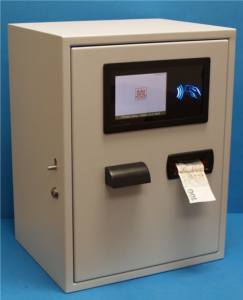
The tankomats at SPU in Nitra are located as follows:
- Hall in front of the student canteen at ŠD Bernoláka.
- Entrance hall at the canteens at ŠD Mladosť.
Meal Service Methods
Lunches are served in 4 canteens:
Lunches are served in 4 canteens:
- two at ŠD Antona Bernoláka – student canteen on the 1st floor, employee canteen on the ground floor, and
- two on the ground floor of ŠD Mladosť, one student canteen and one employee canteen.
Employee canteens serve meals only to employees, and only pre-ordered meals, with service provided. In the employee canteen, the diner chooses a seat, sits at a set table, serves themselves soup from a brought tureen, and the main course is brought by the service staff, who perform all actions at the serving window using the diner’s card.
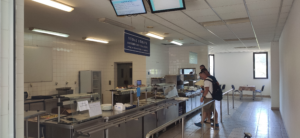
Student canteens serve meals to both employees and students, either for pre-ordered lunches or for additional meals (a la carte lunch selection without the need for advance ordering). Meals are served as self-pickup, with two serving points in each student canteen – one for pre-ordered lunches and one for additional meals. The lunch menu for additional meals is displayed on a monitor at the entrance to the student canteen.
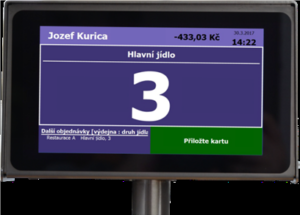
In the student canteen, before picking up the meal, the diner places their card on the reader located below the serving terminal. The number of the ordered lunch (1, 2, 3, 4, 5, 6) will be displayed on the serving terminal, which the staff will serve to the diner.
For a la carte lunch selection (additional meals) that is not pre-ordered, it is necessary to first select the MEAL by touch on the touch-screen serving terminal, then select the MEAL NUMBER (7, 8, 9, 10) according to the lunch options displayed above the serving window or counter, and then confirm the selection by placing the card on the reader below the serving terminal. The chosen meal will be automatically “ordered” and “served” in the system. Subsequently, the staff at the window will serve the chosen meal to the diner.
Ordering Lunches
Lunches can be pre-ordered in two ways. Either via the On-site Terminal, or via WebKredit, i.e., via the internet at obedy.uniag.sk. Lunches can be ordered 1 business day in advance by 2:00 PM. For holidays and days off, it is necessary to order lunch on the business day preceding the holiday or day off, e.g., order lunch on Friday for Monday.
Lunches can be pre-ordered in two ways. Either via the On-site Terminal, or via WebKredit, i.e., via the internet at obedy.uniag.sk. Lunches can be ordered 1 business day in advance by 2:00 PM. For holidays and days off, it is necessary to order lunch on the business day preceding the holiday or day off, e.g., order lunch on Friday for Monday.
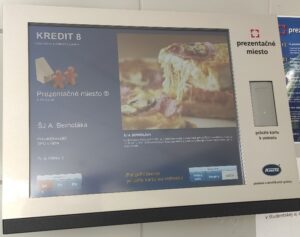
The On-site Terminal is a PC terminal located in front of the canteen entrances, one at ŠD Bernoláka and the other at ŠD Mladosť. The diner logs into the dining system by placing their card on the reader to the right of the touchscreen. On the left side of the display, ordered lunches for the current canteen are shown, and on the right side, the diner selects the lunch number for the next day by touch. By changing the date, they can order several days in advance – usually for one or two weeks. An employee can order lunch at any canteen, employee or student. The ordering of each lunch must be confirmed by touching ‘Order’, and the selected settings are saved by finally placing the card on the reader, which also logs out the diner from their account and prepares the terminal for the next diner.
On the terminal, it is possible to view the account, order and meal pickup history with prices, deposit history, and the resulting current balance summary or statement for the selected month.
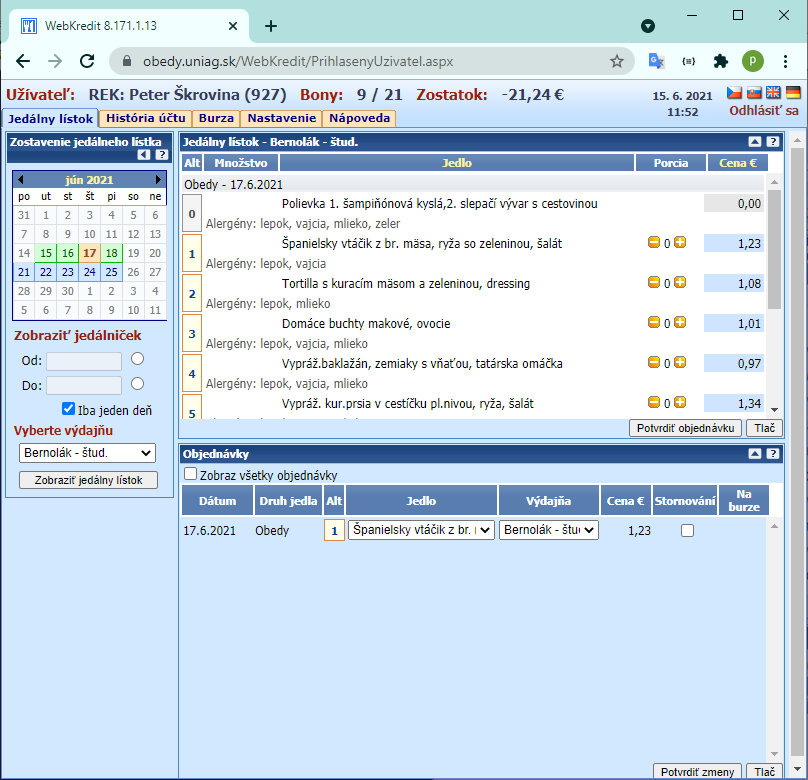
WebKredit is access to the dining account and all functions of the On-site Terminal via a web application at obedy.uniag.sk.
Access is secured via diner login credentials: Personal Number and Password. These details can be obtained by the diner at the canteen cash desk at ŠD Bernoláka, located in the corridor to the left of the reception.
Working in WebKredit is simple and intuitive. After each selection or change, it is necessary to Confirm the order or Confirm changes. You can read the details in the guide.
Types of Lunches
Catering services are provided by a third-party contractor, Mirko Petrík – Gastromir. Meal prices are reviewed twice a year in accordance with the contract, on February 1st and September 1st.
Catering services are provided by a third-party contractor, Mirko Petrík – Gastromir. Meal prices are reviewed twice a year in accordance with the contract, on February 1st and September 1st.
Complaints
As everywhere, errors, oversights, and other unpleasantries can occur here, which cannot be resolved by agreement with the staff and management. Their resolution involves complaints in the Complaint and Suggestion Books located in the canteens, or by reporting to stravovanie@uniag.sk.